JavaScript Guides Advanced
CSS in the Large
CSS is not a programming language. Its syntax was intented to be easy to grasp for designers – people who think
in a visual rather than procedural way. It might be discussed if CSS really fits designers. What I'm sure is that it
doesn't fit programmers, at least the ones I know. Some of them dislike it as a heap of peculiar workarounds for
browsers' limitations. Others point out that CSS lacks a lot of programming constructs, such as variables or
expression evaluation (IE's proprietary extensions, while powerful, look a lot like hacks).
The first argument is particularly valid. Writing stylesheets often requires magical powers and is not straightforward
at all. But the problem lies at broken implementations (sometimes referred to as “browsers”) rather than in CSS
itself. The second shortcoming is clear when it comes to managing large websites. During the last few months I've
been working on a custom intranet content management system as a frontend developer. Let me share my
experiences from this project. I'm really eager to hear comments from you, especially if you have your own
experiences with large scale projects using CSS extensively.
Requirements
The single installation of our CMS in theory can handle even few thousands of websites arranged into groups.
Typical group contains from one to over a dozen of websites. Each group is a separate entity, owned by a
customer who's also responsible for the content. While websites and groups are managed by different people, they
all share similar layout and main functions. It assures consistency across the intranet. Websites within groups are
even more alike to each other, as they usually serve the same purpose.
As you can see, the above setup is very similar to a typical portal or large e-commerce site. There are independent
sections updated by different people but sharing some common branding elements and structure.
During system design phase, I aimed to:
- Preserve consistency across all the sites.
- Allow for design flexibility.
- Maximize code reuse and avoid copy and paste programming.
The hierarchy
We (me and other members of my team) decided to create a 3-level hierarchy for CSS, JavaScript, images and
template files. At the top (“root”) level we put all files needed to lay out a website. So if you set up one, it gets the
default look based on files from a root level.
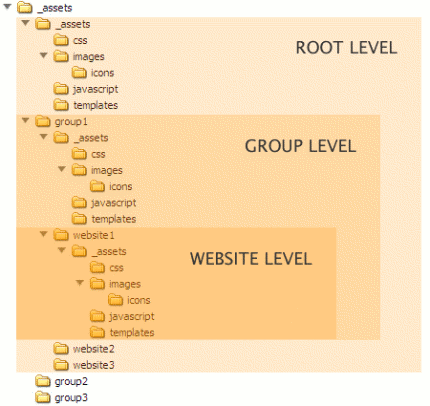
To create a custom appearance for a group you'd need to put new files at lower level. The set of available files has
been defined at the beginning and slightly updated when needed. For example the home icon is always
/images/icons/home.gif. If you want to use a completely different icon for the group, just put this new image in the
corresponding location on the group level. The same rule applies when you want to introduce further customization
on the website level: you just need to place the file in the proper location at the bottom of the directory tree.
How does the CMS know which one to choose? It's looking for the files from the bottom up. If the image, script
or template is found on the website level, then it will be used. Otherwise the application looks for the same file at
the group level or, if it’s not here, at the root level. CSS stylesheets are handled a bit different. The ones from lower
level do not replace the files above, but instead are appended at the end of their “ancestors”. The server-side
mechanism merges all the stylesheets with the same name and sends the result to the browser as a single file. This
exception was made for a reason. CSS rules rarely have to be created from scratch — it's much easier to define
common setup and then to extend it by overwriting individual rules or adding new.
How this approach works in practice? Surprisingly well. Since all the files needed for laying out a new site are
already at the root level, content managers can quickly create a running site and edit content. They don’t have to
wait until designers will finish their work and provide finished design specification. As all websites share the same
codebase they are all consistent. It's also very easy to introduce global changes. All you need is to put the code at
the top CSS file, and all the websites will inherit it. Finally, there is no need to copy the code. You just have to
write things specific to the group or website.
But there is always “but”
All the good things come at some cost. The biggest difficulty with the hierarchy is to control the differences between
portals. It's easy when they have the same grid and typography, and the only differences are colors or images.
Things start to get complicated when each group or even website introduce a new layout. Multiply the number of
CSS files by 50, and you will get the picture. Updates that require overwriting a single rule are easy to implement,
but layout changes quickly become hard to manage. In order the make it work the designer have to keep the
discipline. And have you ever tried to “discipline” your client's requirements?
Another issue is related to features that are used across few groups but not everywhere. Where should they
belong? If you create a copy in each group this feature is needed, you'll quickly face the problem of managing these
different copies. Putting them at the root level sounds better, but in that case all other sites will use bloated CSS
stylesheets.
Going further
How to overcome these problems? The latter could be addressed by further modularization of CSS files. Currently
I've splited stylesheets into few files. colors.css, grid.css, forms.css handle most distinct areas of a design, while
main.css is used for typography, background images and small details. Distinct areas – such as navigation, header,
login form – could have their own stylesheets. These stylesheets should be then included on portal level only when
needed. The pros of this approach is the minimization of the code bloat — only actually used sets of rules would
be included. To make it really work CSS files should be merged on the server. Otherwise dozens of HTTP
requests would kill the performance.
Another idea that pops up is to provide few file hierarchies, each defining completely different visual structure. It
would let the designer to have more flexibility. Moreover, a single installation of the CMS would be able to handle
many diverse groups of independent websites.
I'm using a subjunctive form when writing about these improvements, as I haven't tried them yet. What's clear to
me, after few months of learning by trial and error, is that there is no silver bullet. Each solution involves
compromises and has liabilities. Managing the code of 50 websites can get tricky. Things get even more interesting
when three frontend guys work on the same code simultaneously. But CSS, with all its quirks, glitches and flaws,
simply works. Updates and fixes are quick. Usually I don't even touch HTML templates: the rule “write once and
forget” can be applied only with web standards approach.
—
JavaScripts Guides: Beginner, Advanced
JavaScripts Tutorials: Beginner, Advanced
[Home] [Templates] [Blog] [Forum] [Directory] JavaScript Guides Advanced -
CSS in the Large
|
